How to Cite a YouTube Video in MLA (9th Edition)
Updated · Follows the MLA Handbook, 9th edition (2021)
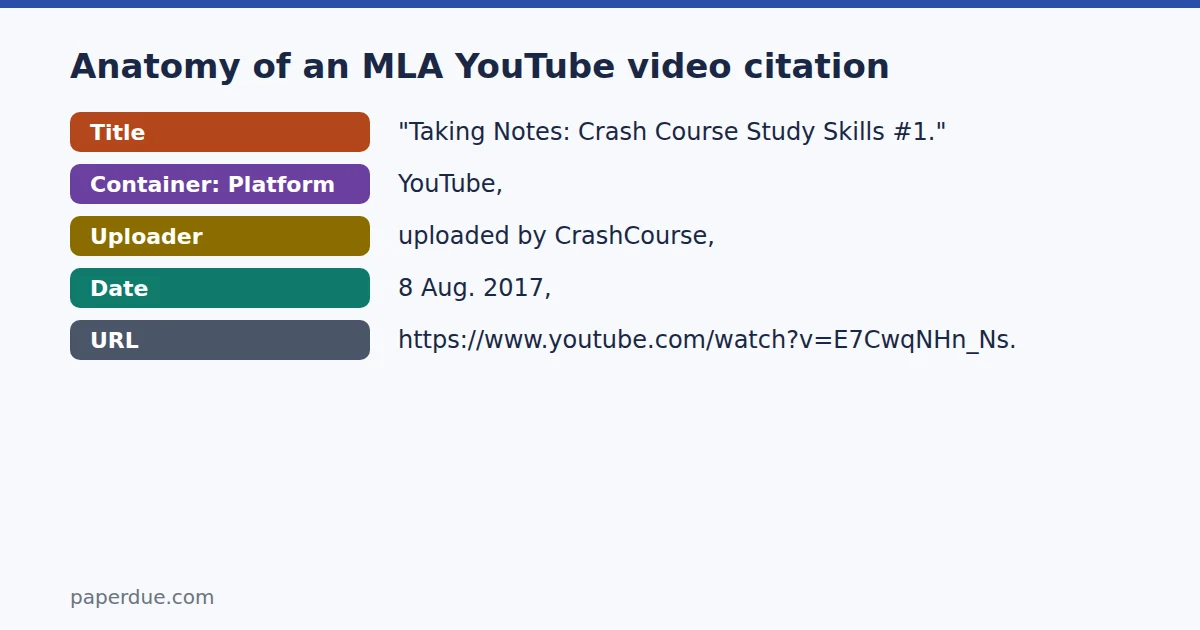
"Title of Video." YouTube, uploaded by Channel Name, Day Month Year, URL.The title goes in quotation marks with title case. The channel name follows "uploaded by." The date uses day, abbreviated month, and year. The entry appears on your Works Cited page."Taking Notes: Crash Course Study Skills #1." YouTube, uploaded by CrashCourse, 8 Aug. 2017, https://www.youtube.com/watch?v=E7CwqNHn_Ns.
("Taking Notes: Crash Course Study Skills #1")
Narrative: "Taking Notes: Crash Course Study Skills #1"
Examples
1. Video uploaded by a channel
The first example shows the standard case: a video uploaded by a named channel with no individual author listed. The title is enclosed in quotation marks and written in title case. "YouTube" is italicized as the container. The date is written day, abbreviated month, year. YouTube is the container, so it is italicized, and the channel is credited after 'uploaded by'.
"Taking Notes: Crash Course Study Skills #1." YouTube, uploaded by CrashCourse, 8 Aug. 2017, https://www.youtube.com/watch?v=E7CwqNHn_Ns.
In-text("Taking Notes: Crash Course Study Skills #1") Narrative"Taking Notes: Crash Course Study Skills #1"
2. Organization channel with the speaker in the title
The second example shows a video whose title already contains the speaker's name and the organization's name separated by pipe characters. MLA keeps those pipes as part of the title. The channel (TED) still appears after "uploaded by" even though it matches the organization named in the title. Every major word in the title, including words after the pipes, is capitalized.
"The Power of Believing That You Can Improve | Carol Dweck | TED." YouTube, uploaded by TED, 17 Dec. 2014, https://www.youtube.com/watch?v=_X0mgOOSpLU.
In-text("The Power of Believing That You Can Improve | Carol Dweck | TED") Narrative"The Power of Believing That You Can Improve | Carol Dweck | TED"
3. Citing a specific moment (timestamp)
The third example is identical to the first in its reference entry. The timestamp appears only in the in-text citation, not in the Works Cited entry itself. This lets you point readers to a specific moment in the video without altering the reference.
"Taking Notes: Crash Course Study Skills #1." YouTube, uploaded by CrashCourse, 8 Aug. 2017, https://www.youtube.com/watch?v=E7CwqNHn_Ns.
In-text("Taking Notes: Crash Course Study Skills #1" 1:30) Narrative"Taking Notes: Crash Course Study Skills #1" (1:30)
In-text citations in MLA
When a video has no individual author, the in-text citation opens with the video's title in quotation marks. The title must begin with the same word as the Works Cited entry so readers can locate it easily. If the title is long, you may shorten it, but always keep the first word intact.
In a parenthetical citation, the title (and any timestamp) sits inside the parentheses, and the period follows the closing parenthesis. When citing a specific moment, the timestamp follows the title inside the parentheses. In a narrative citation, you work the title into your sentence and place the timestamp alone in parentheses immediately after. The third example in the table below shows both forms for a timestamped citation.
| Example | Parenthetical | Narrative |
|---|---|---|
| Video uploaded by a channel | ("Taking Notes: Crash Course Study Skills #1") | "Taking Notes: Crash Course Study Skills #1" |
| Organization channel with the speaker in the title | ("The Power of Believing That You Can Improve | Carol Dweck | TED") | "The Power of Believing That You Can Improve | Carol Dweck | TED" |
| Citing a specific moment (timestamp) | ("Taking Notes: Crash Course Study Skills #1" 1:30) | "Taking Notes: Crash Course Study Skills #1" (1:30) |
Common mistakes
- Forgetting quotation marks around the title Video titles on Works Cited and in in-text citations must appear in quotation marks, not italics. Italics are reserved for the container — in this case, YouTube itself.
- Using sentence case instead of title case MLA requires title case in Works Cited entries. Articles, prepositions, and coordinating conjunctions are lowercase only when they fall in the middle of the title, not at the beginning.
- Writing the date in the wrong order MLA dates run day, abbreviated month, then year. Placing the month first or the year first does not follow MLA 9th edition format. Remember that months longer than four letters are abbreviated.
- Putting the timestamp in the reference entry The timestamp belongs only in the in-text citation, not in the Works Cited entry. The reference entry is the same whether or not you cite a specific moment.
- Starting the in-text citation with the channel name When there is no individual author, the in-text citation must begin with the title, not the channel name. The first word of the in-text citation must match the first word of the Works Cited entry.
Frequently asked questions
What if the video has an individual creator listed — do I still use the channel name?
If an individual creator is credited, MLA lists that person as the author (Last, First.) at the start of the entry, and the in-text citation uses their last name. The channel still appears after 'uploaded by'.
Do I need to include an access date for a YouTube video?
MLA 9th edition treats access dates as optional and most useful when a page has no publication date. Since YouTube videos display an upload date, you generally do not need an access date.
How do I shorten a long video title in the in-text citation?
Begin the shortened title with the same word that opens the Works Cited entry, then cut the rest. This keeps the connection between the in-text citation and the reference clear for your reader.
What if the video was uploaded by a person's name rather than a brand channel?
Give the channel name exactly as it appears on YouTube after 'uploaded by'. The in-text citation still uses the title unless an individual author is credited.
Does the pipe character in a title like the second example need to be changed?
No. MLA keeps the title as it appears on the source, including pipe characters used to separate the speaker's name and the channel name. Apply title case to every segment, including words that follow a pipe.